
FindersCheapers Home Page Home    About us
Reviews
FindersCheapers Home Page
Auto Baby Bluetooth Speakers Clothing Combo Kits Home Laser Printers Textbooks Tools Toys Running Shoes Sports Video Projectors Watches
Find it Cheaper
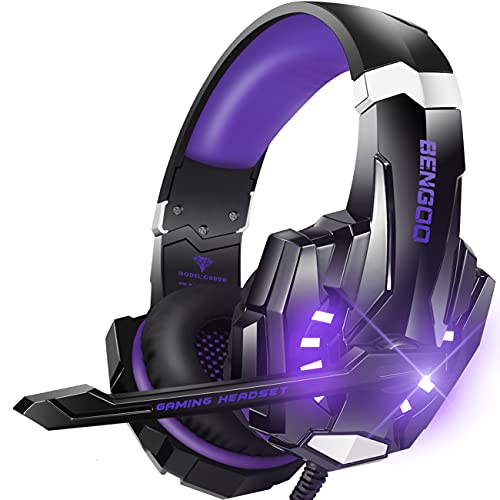
BENGOO G9000 Stereo Gaming Headset for PS5, PS4, PC, Xbox One Controller, Noise Cancelling Over Ear Headphones with Mic, LED Light, Bass Surround, Soft Memory Earmuffs - Purple

BENGOO G9000 Stereo Gaming Headset for PS5, PS4, PC, Xbox One Controller, Noise Cancelling Over Ear Headphones with Mic, LED Light, Bass Surround, Soft Memory Earmuffs - Purple

BENGOO
  • Operating System   Xbox One
  • Format   Electronics
  • 【WIDE COMPATIBILITY】Support PlayStation 4, New Xbox One, PC, Nintendo 3DS, Laptop, PSP, Tablet, iPad, Computer, Mobile Phone. Please note you need an extra Microsoft Adapter (Not Included) when connect with an old version Xbox One controller. 【SURROUND STEREO SUBWOOFER】Clear sound operating strong brass, splendid ambient noise isolation and high precision 40mm magnetic neodymium driver, acoustic positioning precision enhance the sensitivity of the speaker unit, bringing you vivid sound field, sound clarity, shock feeling sound. Perfect for various games like Halo 5 Guardians, Metal Gear Solid, Call of Duty, Star Wars Battlefront, Overwatch, World of Warcraft Legion, etc. Q: Microphone on the headset doesn't work as well as wanted. A: Connect the Separate Splitter (Included) with the 3.5mm jack for this headset to work on PC. Make sure insert the right jack (the pink for the microphone. Make sure none of the Microphone are disabled or muted or something. Q: Item does not work at all. A: Support PlayStation 4, New Xbox One, PC, Nintendo 3DS, Laptop, PSP, Tablet, iPad, Computer, Mobile Phone. Please note you need an extra Microsoft Adapter (Not Included) when connect with an old version Xbox One controller. Make sure that the headset is plugged securely into the headphone jack. there should be no loose connections. Adjust or rotate the 3.5mm interface until both sides of the headphones have smooth sound output. One Side of Headset Not Working:On PS4:1. Make sure that the headset is plugged securely into the headphone jack. there should be noloose connections. Adjust or rotate the 3.5mm interface until both sides of the headphoneshave smooth sound output.2. Turn up the sound switch on the microphone.On PC:You MUST use the 1-to-2 3,5mm jack splitter cable to ensure that each jack is connectedproperly and securely plugged in., Platforms: Xbox One
Comparing BENGOO G9000 Stereo Gaming Headset for PS5, PS4, PC, Xbox One Controller, Noise Cancelling Over Ear Headphones with Mic, LED Light, Bass Surround, Soft Memory Earmuffs - Purple prices
Got an opinion on this product? Review it!
Your Rating:
one star rating two star rating three star rating four star rating five star rating
Not Rated
 
 
Nickname:
 
 
Your Review:
 
 
FindersCheapers strives to maintain the accuracy of product and pricing information displayed on our site, but we do not guarantee the accuracy of the information. If there is a pricing, coupon, or other information discrepancy between FindersCheapers and a merchant's site then the information on the merchant's site will apply. FindersCheapers cannot be held liable for any actions taken based on the information provided and FindersCheapers shall not be held responsible for any loss or damage resulting from business conducted with companies listed on FindersCheapers. FindersCheapers receives compensation from all merchants whose products are displayed. Refer to our Conditions of Use and About Us pages for complete details. To report a pricing error, click here.
Conditions of Use Privacy Notice About Us
FindersCheapers.com Copyright 2026